AI Workflow Automation: Complete Business Guide | Cognitiev

AI Workflow Automation: How to Automate Complex Business Processes
Most companies do not struggle with automation because the tools do not exist. They struggle because their workflows are too tangled for rigid, rules-based automation to handle. A lead comes in through three different channels, a contract needs review before it can move forward, or a support ticket needs context from five systems before anyone can act on it.
Traditional automation breaks the moment a process has more than a couple of decision points.
AI workflow automation changes that equation. Instead of scripting every branch in advance, it lets an AI agent reason over context, decide what to do next, take action through existing systems, and hand off to a human when judgment exceeds what the agent should decide alone.
This guide explains what AI workflow automation is, how it differs from traditional automation, the anatomy of an AI-driven workflow, and how to implement one with a worked example and an ROI framework for building a business case.
What Is AI Workflow Automation?
AI workflow automation is the use of AI agents - software that can reason, decide, and act - to run multi-step business processes end-to-end, adapting to context instead of following a fixed script.
A traditional workflow tool executes steps in a predetermined order: if field A equals X, do B. An AI-powered workflow gives an agent a goal, access to context such as data, documents, and past interactions, and a set of tools or APIs it is allowed to use.
The agent reasons about the best path to the goal, executes actions, checks its results, and escalates when the situation calls for judgment the model should not make alone.
This matters most for processes with branching logic, incomplete data, multiple systems of record, and edge cases: lead qualification, contract review, customer onboarding, invoice reconciliation, and support escalation.
Traditional vs AI-Powered Workflows
Traditional automation such as RPA, BPA, and rules engines is deterministic: it does exactly what it is told. AI-powered workflows are adaptive: they interpret unstructured input, make judgment-based decisions, and use additional context.
| Dimension | Traditional Workflow (RPA / BPA) | AI Workflow Automation (Agentic) |
|---|---|---|
| Logic | Fixed if/then rules and hard-coded branches | Reasoning over context to decide the next best action |
| Input handling | Structured data only | Structured and unstructured data including emails, calls, PDFs, and chat |
| Adaptability | Breaks outside scripted paths | Handles novel cases within defined guardrails |
| Setup effort | Every branch must be mapped and coded | Agent receives a goal, tools, and policies |
| Maintenance | New edge cases require new rules | Agent adapts while guardrails are tuned |
| Best fit | High-volume, repetitive, low-variance tasks | Multi-step, judgment-heavy, cross-system processes |
| Failure mode | Silent failure or unexpected-input error | Uncertain cases are escalated by design |
| Examples | Data entry, invoice OCR, password resets | Lead qualification, contract triage, support routing, collections |
Most mature organizations combine both. RPA handles repetitive, high-volume, low-variance steps inside a workflow that an AI agent orchestrates and makes decisions within. The agent is the reasoning layer; RPA and APIs are the execution layer.
Anatomy of an AI Workflow
Every AI-driven workflow is built from components that make it debuggable, auditable, and safe to run in production rather than a black box that occasionally behaves unexpectedly.
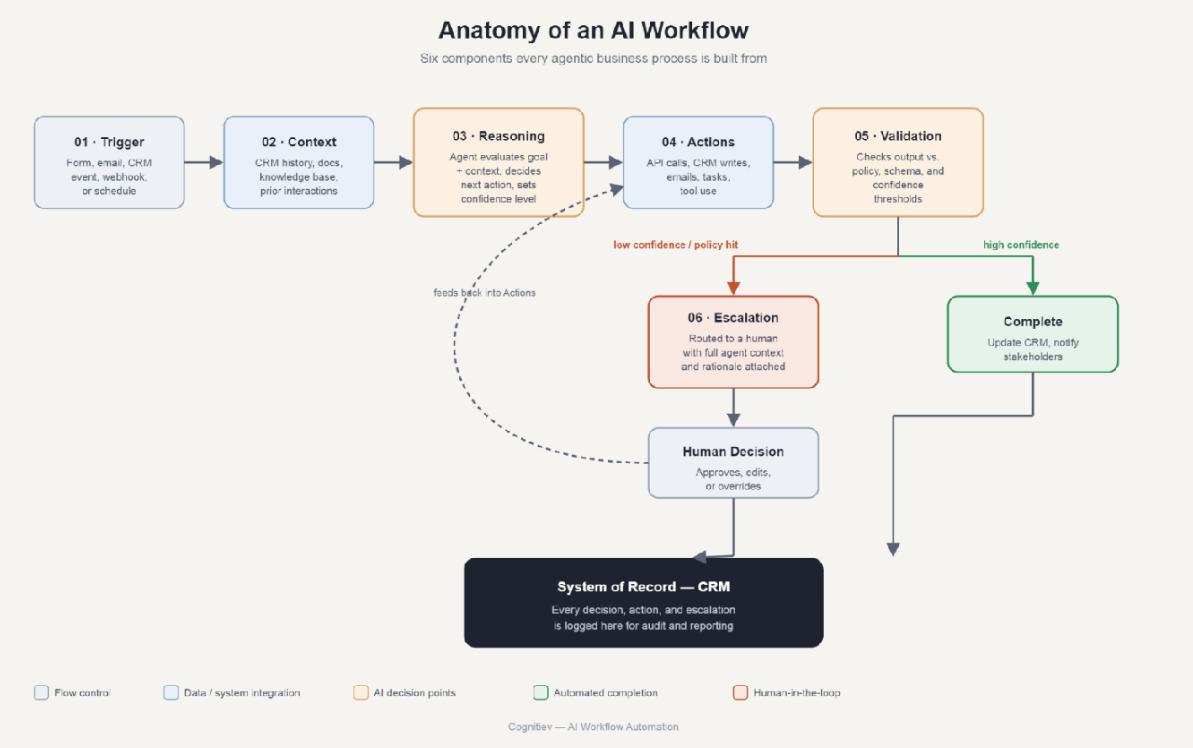
Triggers
A trigger starts the workflow: a new form submission, inbound email, CRM status change, third-party webhook, or scheduled check. Good workflows are trigger-agnostic where possible, so the same agent logic can be called from a website form, phone transcript, or Slack message.
Context
Before an agent can reason well, it needs the customer history, relevant policy, prior interactions, account status, and structured data tied to the record. The agent retrieves and synthesizes information from the CRM, knowledge base, past tickets, and contracts.
Reasoning
The reasoning stage evaluates context against the goal and guardrails, then decides what to do next. It may classify lead intent, assess a contract clause, or determine whether a support ticket can be resolved automatically. Its output is a decision plus confidence and rationale.
Actions
The agent calls tools: updating a CRM record, sending an email, creating a project task, generating a document, or triggering a downstream workflow. The agent chooses which tool to call and with what parameters.
Validation
A validation layer checks output against business rules, confidence thresholds, a second model pass, or a structured schema. It catches hallucinated data, out-of-policy actions, and low-confidence decisions before they reach a customer or system of record.
Escalation
When a decision is uncertain, high-stakes, or outside the agent's authority, the workflow routes it to a human with full context attached. Agents should expand what gets automated, not replace judgment on calls that need it.
CRM Integration
Most complex business workflows revolve around a CRM because it is the system of record for the customer, deal, or case. AI workflow automation depends on CRM integration for three reasons:
- Context depends on it. The agent can pull account history, deal stage, prior tickets, and communication logs before making a decision.
- Actions depend on it. Lead scores, activities, deal stages, and tasks must be updated through governed write access.
- Auditability depends on it. Every AI decision and action should be logged against the record it affected.
Salesforce, HubSpot, Zoho, or a custom CRM can sit at the center of the architecture as both a context source and the system of record updated at the end of the loop.
Example: Lead Qualification and Routing
Consider a B2B software company receiving leads from a website form, chatbot, and inbound calls. Sales representatives spend 20 to 30 minutes per lead checking firmographic data, reading the inquiry, and deciding who should own follow-up.
- Trigger: A lead submits a form, a chatbot conversation ends, or a call transcript is generated.
- Context gathering: The agent pulls company size, industry, account history, and inquiry text, then enriches firmographic data.
- Reasoning: It classifies intent, scores fit against the ideal customer profile, and recommends an enterprise AE, SMB queue, or resource link.
- Action: It updates lead score and stage, assigns ownership, and drafts or sends a personalized first-touch email.
- Validation: High-confidence classifications proceed automatically; unclear company size or contradictory inquiry text is flagged.
- Escalation: Ambiguous or high-value leads go to a sales manager with the agent's reasoning attached.
- CRM update: Every automated or human-reviewed outcome is logged as the permanent record.
Representatives spend time only on leads needing human judgment, while every lead receives a consistent, logged evaluation.
Other common examples include contract review, customer support triage, invoice and accounts-payable processing, and employee onboarding.
How to Implement AI Workflow Automation
Rolling out AI workflow automation works best as a staged process rather than a single big-bang deployment. Use this checklist as a starting implementation plan:
- Map the current process end-to-end, including every manual handoff, decision point, and system touched.
- Pick one high-volume, well-understood workflow for the first build. Lead routing and support triage are common starting points because outcomes are easy to measure.
- Define the agent's authority boundaries explicitly: what it can decide alone, what needs validation, and what always escalates.
- Connect context sources such as the CRM, knowledge base, and document stores before building reasoning logic.
- Build the action layer using APIs or existing integration and RPA connectors so the agent can execute, not just recommend.
- Add validation checks and confidence thresholds before the workflow goes live with real data.
- Design the escalation path with a full context handoff, not a bare alert.
- Run in shadow mode first, letting the agent make recommendations a human approves before granting write access to production systems.
- Instrument everything: log every decision, action, and escalation so outcomes can be audited and guardrails improved.
- Review and expand scope on a fixed cadence, such as monthly, as confidence in the workflow grows.
This staged approach mirrors how larger platforms frame deployment: build, test, govern, and then scale agents across the business rather than deploying full autonomy on day one.
Measuring ROI from AI Workflow Automation
The business case for AI workflow automation rests on four measurable levers:
- Cycle time. Measure how much faster a process completes end-to-end. Lead response, ticket resolution, and contract turnaround are easy to benchmark.
- Cost per transaction. Compare the fully loaded cost of a human completing a step with the cost of an agent, including validation and escalation overhead.
- Escalation rate over time. A well-tuned workflow should see escalations decline as guardrails and context quality improve.
- Error and rework rate. Fewer dropped handoffs and data-entry errors translate into fewer downstream corrections.
To estimate ROI, calculate the current fully loaded cost of the process using hours, loaded hourly rate, and error or rework cost. Estimate the percentage of volume that can be handled without escalation once the workflow matures, then multiply that percentage by expected volume and compare the result with implementation, validation, and monitoring costs.
Well-scoped processes such as lead triage or ticket classification commonly become strong early candidates when 60 to 85 percent of volume can be handled without escalation.
Governance and Human Oversight
- Use approved sources for business-critical answers.
- Keep an audit trail of decisions and tool actions.
- Limit access to the data and systems each workflow needs.
- Require approvals for high-impact actions.
- Give employees a clear way to review and correct outcomes.
- Monitor quality, drift, failures, and unusual activity.
- Provide a human escalation path for customers and employees.
The best workflows are not autonomous in every situation. They are predictable about when to act, when to ask, and when to involve a person.
The Bottom Line
AI workflow automation connects AI agents, CRM data, communication channels, business applications, and human teams so complex processes can move forward with less manual coordination.
It is most valuable when work crosses systems, depends on context, and requires more than a single fixed rule. Start with one measurable workflow, define its boundaries, connect the systems it needs, and improve it using real operational data.
Frequently Asked Questions
What is AI workflow automation?
AI workflow automation uses AI agents to run multi-step business processes - reasoning over context, deciding what to do, taking action through connected systems, and escalating to a human when a decision needs judgment beyond the agent's authority.
How does AI workflow automation work?
It works through a loop: a trigger starts the process, the agent gathers context from connected systems, reasons about the best next step, takes action via APIs or tools, validates its own output against confidence thresholds and business rules, and either completes the task or escalates it to a person with full context attached.
How is AI workflow automation different from RPA?
RPA executes fixed, scripted steps and breaks on anything outside its rules. AI workflow automation adds a reasoning layer that can interpret unstructured input and adapt within guardrails, often calling the same RPA bots or APIs as the execution layer underneath that reasoning.
Which business processes benefit most from AI workflow automation?
Processes with multiple decision points, unstructured input, and cross-system data - lead qualification, contract review, support triage, invoice reconciliation, and employee onboarding are the most common high-ROI starting points.
Do AI workflows still need human oversight?
Yes. Production-grade AI workflows are built with validation and escalation stages by design, so humans review or make the final call on high-stakes, ambiguous, or out-of-policy decisions rather than being removed from the loop entirely.
How do I connect an AI workflow to my CRM?
Most CRMs expose APIs that let an agent read context such as account history and deal stage, and write actions such as updates, task creation, and activity logging, under the same permission model your team already uses.
How long does it take to implement an AI workflow?
A single well-scoped workflow can typically move from mapping to a shadow-mode pilot in a few weeks, with full production rollout following a validation period once escalation rates and accuracy are within acceptable ranges.
What does AI workflow automation cost to implement?
Cost depends on process complexity, the number of systems integrated, and how much custom validation logic is needed, but the highest-ROI first projects are usually high-volume, well-documented processes where automating a majority of volume produces a fast payback.